vk-bench: a Vulkan benchmark you can actually reason about
vk-bench: a Vulkan benchmark you can actually reason about
Big graphics codebases are good at shipping features, but they are bad at answering narrow performance questions. Once frame time depends on scene streaming, asset formats, material systems, and background work, it becomes hard to tell what a single draw or dispatch really cost.
vk-bench takes the opposite route. The repository is a deliberately small Vulkan micro-benchmark with one executable, a handful of controlled scenes, and JSON output that is simple enough to diff in CI or compare by hand. The point is not to simulate a game engine. The point is to make GPU experiments easy to repeat and easy to explain.
Repository: semihguresci/GpuProfilingPayground
Why this repository is useful
Three choices make vk-bench more practical than a throwaway sample:
- It runs one workload per frame and keeps the output format stable.
- It records both CPU submit-to-complete time and GPU timestamp time.
- It supports a reproducible Linux Docker path with NVIDIA GPU access as the default workflow.
That gives the repository a good shape for regression tracking. When a number moves, there are fewer moving parts to blame.
What the benchmark covers
Today the executable exposes four scenes:
triangle: minimal graphics path with one triangle by default, or--triangles Nfor controlled scaling.million-tris: a raster-heavy draw of 1,000,000 triangle instances.compute-copy: a compute-only storage-buffer dispatch.
The timing model is also intentionally narrow:
- GPU time comes from two Vulkan timestamps around the recorded workload.
- CPU time measures submit-to-complete per frame.
- Warmup frames are excluded from the final stats.
That separation matters when reading the numbers below. CPU time here is not just command recording overhead. It includes the end-to-end time the application waits around a frame.
A first pass over the checked-in results
The repository already contains benchmark outputs in results/. The charts below use the checked-in sample runs for:
results/triangle.jsonresults/million-tris.jsonresults/compute-copy.json
All three were captured headless at 1920x1080 on an NVIDIA GeForce RTX 2080 SUPER, with 5 warmup frames and 30 recorded frames.
| Scene | CPU avg (ms) | GPU avg (ms) | CPU p95 (ms) | GPU p95 (ms) |
|---|---|---|---|---|
triangle |
0.0795 | 0.0090 | 0.0730 | 0.0102 |
million-tris |
0.7534 | 0.6951 | 0.7480 | 0.6747 |
compute-copy |
8.4291 | 8.3235 | 9.2829 | 9.2128 |
These values are copied directly from the checked-in JSON outputs. In this codebase, p95 is the sorted sample at floor(0.95 * (n - 1)), not an interpolated percentile, so with 30 recorded frames the average can end up slightly above p95 if a small number of spikes pull the mean upward.
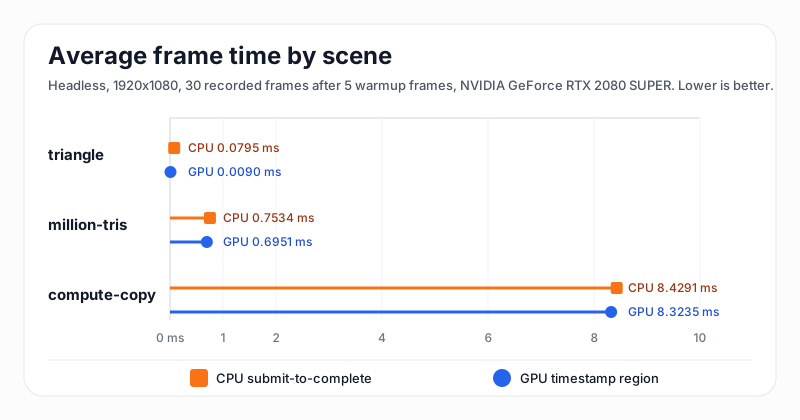
There is a clean progression in workload intensity.
triangle is effectively the sanity-check path. The GPU work is almost invisible at 0.0090 ms average, which is exactly what you want from a scene that exists to validate the render path, shader lookup, screenshot capture, and headless graphics flow.
million-tris is where the benchmark becomes interesting as a graphics stress test. It stays below 1 ms on both CPU and GPU in the checked-in sample, but it is far enough above the tiny triangle case to show meaningful movement when shaders, synchronization, or driver behavior change.
compute-copy is the heavyweight path in the current sample set. Its average GPU time lands at 8.3235 ms, and the CPU submit-to-complete number is close behind at 8.4291 ms. That tells us the measured frame is dominated by the dispatch and its completion, not by a large amount of extra host-side work around it.
Tail behavior matters too
Average frame time is useful, but p95 usually tells you faster whether a benchmark is stable enough for regression tracking.
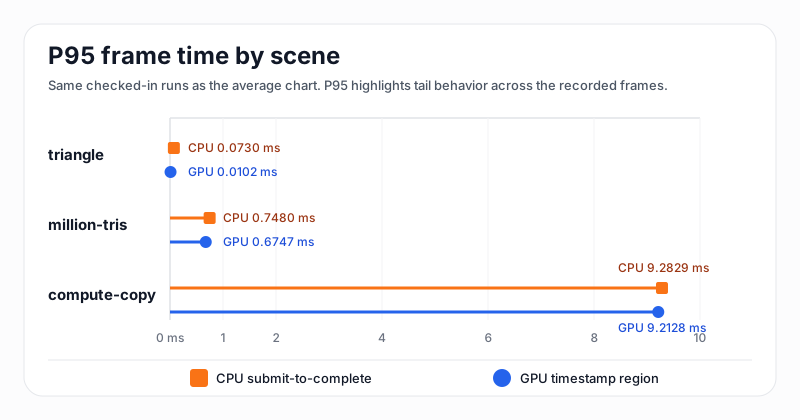
The million-tris run looks tight: the p95 values stay close to the averages on both CPU and GPU. compute-copy is also fairly compact, but the tail stretches to a bit above 9.2 ms, which is large enough to watch if this scene becomes a primary regression target.
The triangle scene needs a different reading. Its absolute timings are so small that tiny scheduling effects can distort the relationship between average and p95. That does not make the data useless. It just means this scene is better used as a correctness and low-overhead smoke test than as a precision performance signal.
Reproducing the runs
The repository is set up so that reproducing the data is straightforward.
Run the scripted batch:
scripts/run_bench.sh results
Each run writes JSON with scene metadata plus avg, p50, and p95 for CPU and GPU frame times. Graphics scenes also emit a screenshot bitmap next to the JSON output, which makes it easier to pair performance data with a visible correctness check.
Where this benchmark can go next
vk-bench is already useful because it is small, deterministic, and easy to inspect. The next high-value step is not a broader scene catalog. It is deeper repeatability:
- Store more benchmark history in
results/or CI artifacts to make trend lines possible. - Use the existing Nsight helper to connect frame-time deltas back to queue activity and synchronization.
That is the real strength of this repository. It is not trying to be a benchmark suite for everything. It is trying to be a benchmark you can still understand after opening the source file.